Comprehensive Guide to Online Fax Services
What Are Online Fax Services?
Online fax services replace traditional phone‑line fax machines with cloud‑based platforms that send and receive faxes over the internet. Instead of feeding paper into a hardware unit, users upload digital documents from a computer, smartphone, or tablet, and the service routes the fax to the recipient’s fax machine or email inbox.
Because the process is entirely software‑driven, businesses benefit from faster delivery times, reduced paper waste, and lower operational costs. The service typically includes a web dashboard where users can manage contacts, view transmission logs, and store received faxes securely.
Who Can Benefit from Online Fax Services?
While the technology is simple, its impact spans many industries. Any organization that still relies on fax for legally binding documents, signatures, or legacy workflows can gain efficiency by moving to an online solution.
- Healthcare providers needing HIPAA‑compliant document exchange.
- Legal firms that transmit contracts and court filings.
- Real‑estate agencies sharing property disclosures.
- Financial institutions handling loan applications.
- Small businesses that want a professional fax number without buying equipment.
These use cases illustrate why online fax services have become a core component of modern office automation.
Key Features and How They Work
Most providers bundle a core set of features designed to streamline the fax workflow. At the heart of every platform is a **dashboard** that centralizes sent and received faxes, allows you to track delivery status, and stores documents for easy retrieval.
Document Management & Automation
The dashboard often includes **automation** rules, such as forwarding incoming faxes to specific email addresses or automatically renaming files based on sender data. This reduces manual handling and integrates fax traffic directly into existing **workflow** tools.
Integration Capabilities
Most services support **integration** with popular cloud storage (Google Drive, Dropbox) and CRM platforms (Salesforce, HubSpot). By linking your fax service to these systems, you can attach faxes to customer records without leaving your primary business applications.
Additional features may include multi‑user access, custom fax numbers, and mobile apps that let you send and receive faxes on the go.
Typical Pricing Models and Cost Considerations
Pricing for online fax services usually follows a subscription model, with tiers based on the number of fax pages, users, and premium features such as advanced security or dedicated phone numbers. When evaluating cost, consider both the monthly fee and any per‑page charges for outbound or inbound faxes.
Below is a simplified comparison of three common pricing tiers. Exact rates vary by provider, but the table gives a sense of what to expect.
| Plan | Monthly Cost (USD) | Pages Included | Key Features |
|---|---|---|---|
| Basic | $9.99 | 200 inbound / 200 outbound | Email‑to‑fax, basic dashboard, web support |
| Professional | $24.99 | Unlimited inbound / 500 outbound | Multiple users, integrations (Google Drive, Dropbox), priority support |
| Enterprise | Custom | Unlimited | Dedicated numbers, API access, HIPAA compliance, SLA guarantees |
When budgeting, factor in any additional costs such as extra page packs, premium support lines, or optional add‑ons like e‑signature capabilities.
Setting Up and Integrating Online Fax Services
Getting started is typically a three‑step process: sign up, configure your fax number(s), and connect the service to your existing tools. Most providers offer a guided **setup** wizard that walks you through each stage.
- Account creation: Provide basic contact information and choose a billing plan.
- Number provisioning: Select a local, toll‑free, or international fax number based on your business needs.
- Integration: Link the service to email clients, cloud storage, or CRM platforms using built‑in connectors or simple API keys.
After the initial configuration, test the system by sending a trial fax to confirm that delivery reports appear correctly in the dashboard. Most vendors also provide sample templates to help you standardize document formatting for fax transmission.
Security, Reliability, and Compliance
Because faxes often carry sensitive information, security is a top priority for reputable online fax providers. Standard safeguards include TLS encryption for data in transit, encrypted storage at rest, and two‑factor authentication for user login.
Reliability is measured by service uptime and delivery success rates. Look for providers that publish a **reliability** SLA (service‑level agreement) with at least 99.9% uptime. For industries such as healthcare or finance, **compliance** with regulations like HIPAA, GDPR, or FINRA may be required, so verify that the service offers the necessary certifications.
Support Options and Customer Service
Effective support can make the difference between a smooth adoption and ongoing frustration. Most providers offer a mix of self‑service resources (knowledge base, video tutorials) and direct assistance (email, live chat, phone).
When reviewing support, consider the following:
- Response time guarantees for critical issues.
- Availability of a dedicated account manager for enterprise plans.
- Community forums where users share tips and troubleshooting steps.
Many services also provide onboarding specialists who can help migrate existing fax numbers and train staff on the new workflow.
Evaluating Vendors – Decision Checklist
Before committing to a specific online fax service, use the checklist below to compare options against your business requirements.
- Does the provider support the required **security** standards (e.g., TLS, encryption at rest)?
- Are the pricing tiers aligned with your projected fax volume?
- Is there seamless **integration** with the tools you already use (email, CRM, cloud storage)?
- What is the documented **reliability** and uptime SLA?
- Does the vendor offer **support** channels that match your preferred communication style?
- Are there any hidden fees for additional pages, extra numbers, or premium features?
- Is the service **scalable** to accommodate future growth or seasonal spikes?
Answering these questions will help you select a solution that fits both current and future business needs.
Frequently Asked Questions
Can I receive a fax directly to my email?
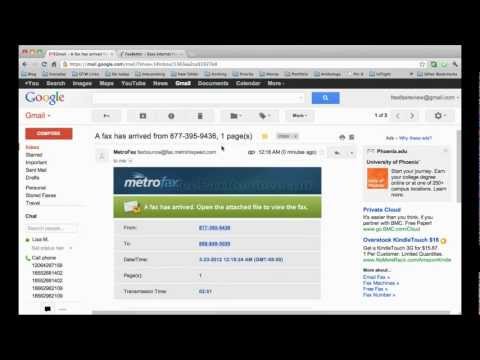
Yes. Most online fax services convert incoming faxes into PDF attachments and forward them to a designated email address, eliminating the need for a physical fax machine.
Do I need a dedicated fax number?
A dedicated number is optional but recommended for professional branding. Many plans let you choose a local, toll‑free, or vanity number at no extra cost.
Is there a limit to how many pages I can send?
Limits depend on the chosen plan. Basic tiers often set a monthly cap, while higher tiers offer unlimited outbound pages.